

If you’re writing a WordPress plugin, you don’t want to write features that allow your users to be vulnerable to security bugs. The current_user_can function is a native WordPress security function that asks the question “Is this user authorized to make this function call?” It’s a critical part of ensuring authorization before executing a function.
The current_user_can function often gets overlooked in place of the wp_verify_nonce function. Both functions are important to protect your WordPress plugins, but they each have their own distinct protections. Usually, when you have ajax handlers in WordPress, you need to use both functions, especially if you have granular features only administrators can use. This article is specific to the current_user_can function, but you can read my write-up for wp_verify_nonce to get example code for how to use it as well.
When to Use current_user_can in WordPress
Most WordPress plugin developers focus on features and functionality, but they often forget about security. According to Wordfence threat intelligence, there have been over 33,000 vulnerability records in their dashboard. This number is probably from the bug bounty that Wordfence introduced in 2023.
Scroll down the list of known vulnerabilities, and you’ll find a lot of recent exploit reports are from missing authorization validation. It’s likely because this security bug is the easiest to spot if you are a penetration tester, but it’s by far not the most common. The most common is SQL injection, but that’s a write-up for another day.
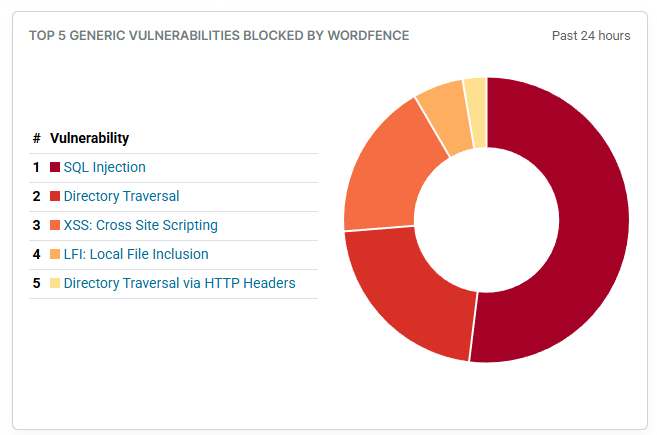
Wordfence threat intelligence graph
If you’d like to see an example of an authorization security bug caused by a missing current_user_can function call, you can check out my write-up on two privilege escalation examples CVE-2025-14428 and CVE-2025-8489 where a low-privilege user could add an administrator account and take over a site owner’s WordPress site. Both plugins are now fixed, but I go over where the authorization code was missing in those two blog posts..
In both code examples, you can see that the security patch involved adding the current_user_can function. This function does an authorization check before performing an action. For example, suppose that you have a plugin that exports a list of subscribers to a CSV file. You only want administrators to perform that action, so you use current_user_can to validate that the user can execute the action. Any type of function that requires a certain permission should start with authorization validation with current_user_can.
WordPress current_user_can Example Code
Let’s take a look at a plugin with a known authorization security bug before and after using current_user_can. In CVE-2026-0844, the Simple User Registration plugin did not authorize that the current user could edit profiles in a function named profile_save_field. This meant that a low-privilege user, like a contributor or a subscriber, could make changes to other low privilege users, or even an administrator user.
Take a look at the Simple User Registration function code before the security fix (some of it snipped for brevity):
function profile_save_field(){
   if( ! wpr_is_nonce_clear( 'wpr_profile_updating') )
             die('sorry for security reason');

   if( ! isset($_POST['wpr']) ) return null;
        // SECURITY FIX: Sanitize and validate user_id
         $user_id = absint($_POST['current_user']);

         if (!$user_id) {
             //….. error for invalid user_id
         }

         $this->set_user_data( $user_id );
         $profile_data = $_POST['wpr'];
         $this->user->update_profile( $profile_data );
         //.....snipped for brevity
}
In the above code example, you can see that a previous security bug was fixed. The plugin author verifies that $user_id passed to the function is valid, but he doesn’t validate that the current user executing the function has permission. The function retrieves the profile content, checks that the user ID being edited is valid, but no authorization checks are done. This caused a critical security bug.
The plugin author was quick to make a security fix after the issue was reported. Now, you can see the same function in the new updated code (some code snipped for brevity):
function profile_save_field(){

   // check nonce for security
   if( ! wpr_is_nonce_clear( 'wpr_profile_updating') )
      die('sorry for security reason');

   if( ! isset($_POST['wpr']) ) return null;

  // SECURITY FIX: Sanitize and validate user_id
   $user_id = absint($_POST['current_user']);
   if (!$user_id) {
        // error for invalid user_id
    }</span>

    // SECURITY FIX: Authorization check - users can only edit their own profile
    $current_user_id = get_current_user_id();
    if ($user_id !== $current_user_id && !current_user_can('edit_users')) {
       //.. snipped error message

    }

    $this->set_user_data( $user_id );
    $profile_data = $_POST['wpr'];
    $this->user->update_profile( $profile_data );
     //...snipped for brevity
}
Notice that the second SECURITY FIX section has a new line where it has an if statement that checks for a valid $user_id and then uses current_user_can(‘edit_users’) to ensure that the current user has permission to ‘edit_users’ before updating a profile. The function returns true or false.
For reference, roles and permissions (called “capabilities” in WordPress) are stored in the MySQL database in a table named wp_user_roles. Roles and capabilities are set up in WordPress, but you can also change and add roles and permissions to individual users, if your plugin requires it. Here is a short snippet of adding a permission for a user:
// Get the user object by their ID (e.g., User ID 5)
$user = get_user_by( 'ID', 5 );
// Add a specific capability to this user
if ( $user ) {
    $user->add_cap( 'edit_users' );
}
Notice that the code snippet adds edit_users permissions to a user with the ID of 5. This ties into the above code where you would then validate that a user has authorization to edit users. In your plugin, you can then use the following statement (or something similar) to your code to check authorization:
if ( !current_user_can('edit_users')) {

    //.. Error message saying nope can’t do that

}
WordPress also has a function named user_can when you want to check if a user other than the current user has permission to perform an action. The user_can function is useful when you want to let an administrator check permissions for a certain user, or a specific user can perform actions on behalf of another user.
Subscribe for More Fun WordPress Security Content
I spend my days checking out the latest vulnerabilities to help new devs understand the importance of coding secure WordPress plugins. Sign up for my newsletter to get alerted to more WordPress vulnerabilities and tutorials.