
The first step in generating AI-based responses to your user queries is to transform words into numbers and building vectors of similar words. Word tokenization and then vectorization are two base concepts surrounding the way large language models (LLMs) interact with users and their queries. Computers understand numbers, not words, even if LLMs veil this step when you work with them. This article highlights the basics of tokenization and vectorization with a bit of code to illustrate how it’s done.
We’ll use a chatbot and user queries as the foundation for the example scenario. You might have a more complex situation, like a RAG (Retrieval-Augmented Generation) system and agents that work with LLMs to customize output, but they all tie into tokenization and vectorization as the first steps in automation and AI-based output. If you’re a developer and are tasked with building AI-based automation, then you need to perform these first steps. Luckily, plenty of Python libraries will do the work for you, but this article is intended to give you a basic understanding of why it’s important and how to use these libraries.
The entire purpose of transforming words into numbers (the first step in vectorization) is that computers understand numbers, not words. You need to create relationships between words, represented as numbers where words are given a number to identify their similarity to other words. The numbers are then transformed into a vector database to build relationships between words. Word relationships (represented by numbers) are how you get semantic results from a general query. This concept sounds convoluted, but we’ll do an illustration to make it easier to understand.
Converting Words to Numbers and Vectors
In an enterprise application, you could conceivably have millions of words linked together in a vector database, but we’ll simplify the process into a few words for brevity. As a developer, you can build word relationships in the same way you build classes. For example, a dog and a cat are animals, but a dog is not a cat. They are related, but not the same.
Now, let’s consider that you need to tokenize words, meaning that you convert them to numbers. For example, if we turn a few animal words to numbers:
Dog = 1
Cat = 2
Parrot = 3
Animal = 4
Fish = 5
All five of these words are related in that they are animals but you wouldn’t want a question about types of birds to answer with a dog or cat. You could, however, answer questions about the types of animals with all three words. Interpretation of these questions and the answers based on words are done with vectors.
A vector (in the AI sense) is a collection of numbers where words (in this case, a list of animal-related words) are represented as numbers in a way that tells you how closely they are related. Think of tokenization as transformation into numbers, and then vectorization is the mathematically calculated relationship between these words. Let’s take a look at a sample table if we wanted to vectorize the five animal words:
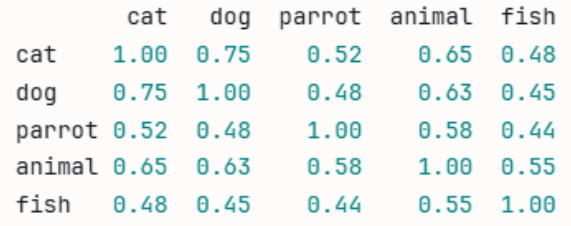
Look at the row containing “cat” and the column containing “cat.” At the intercept, both cat and cat are 1, because they are the same. In the rest of the fields along the cat row, you can see how a vectorized table displays a numeric value as it relates to the similarity of a cat. Now, let’s throw a completely unrelated word into the mix to see how the numbers relate to each other. We added “chair” to the list of words.
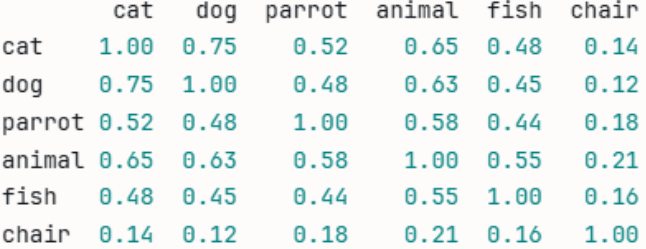
Notice how “chair” has a far smaller number compared to every other animal on the list. As you can probably guess, the reason for the low number is because a chair is unrelated to every other word on the list. This type of tokenization and vectorization is how an LLM answers queries from users. This example is a small vector, but an LLM works with trillions of words, which is why you need enormous resources to process each query.
An Example of Tokenization and Vectorization Using Code
Using a chatbot example scenario, now let’s say that you want to put tokenization and vectorization into practice. Let’s say that you have a small chatbot where users can ask questions about animals. You have your own encyclopedia of information about animals, so you want to use it as a basis for your AI-based chatbot output. Your encyclopedia of information is referred to as a “corpus.”
The corpus is divided into chunks and transformed using a model. For this example, we use a very small model named all-MiniLM-L6-v2. In a real-world scenario, you would use a much bigger model like BERT, but we’re using a small model for speed and simplicity for our chatbot example. The model encodes the words from the corpus so that a user’s query can also be vectorized and then compared to the corpus. The final step is to use an LLM to provide output (the answer) to the user.
Let’s do the first step. You’ll need to install a few dependencies first. These libraries will do all the work for you and build relationships between user queries and your corpus. In case you are new to Python, you install it from your Python console using the following statement:
pip install sentence-transformers scikit-learn pandas numpy
With the libraries installed, now use the following Python code:
from sentence_transformers import SentenceTransformer
from sklearn.metrics.pairwise import cosine_similarity
import pandas as pd

# --- 1. Animal-related document with one unrelated chunk ---
chunks = [
 "Cats are independent pets that are known for their curious and playful nature.",
 "Dogs are loyal companions and are one of the most popular pets in the world.",
 "Parrots are intelligent birds that can mimic human speech and live for decades.",
 "Animals require proper care, nutrition, and a safe environment to thrive.",
 "Fish are peaceful pets that are easy to care for and come in thousands of species."
]

# --- 2. Convert all chunks to vectors ---
model = SentenceTransformer("all-MiniLM-L6-v2")
chunk_vectors = model.encode(chunks)

# --- 3. Compare every chunk against every other chunk ---
similarity_matrix = cosine_similarity(chunk_vectors)

labels = ["cat", "dog", "parrot", "animal", "fish", "chair"]
df = pd.DataFrame(similarity_matrix, index=labels, columns=labels).round(2)
print(df)
Note that we left “chair” in the list of labels to illustrate how words can be mathematically related or unrelated to each other. The corpus (an array of sentences assigned to the variable “chunks” in our example) contains our encyclopedia of information about animals, and then we use the sentence transformer to turn them into numbers. We then use the model of numbers to create a similarity matrix.
Our output:
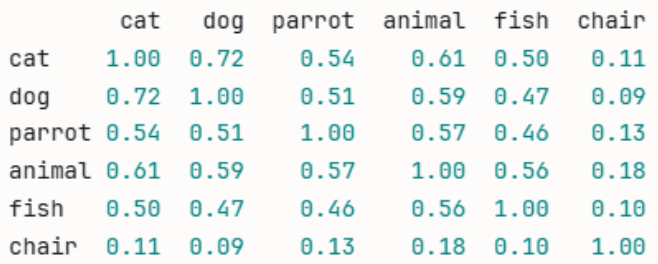
While this correctly calculates relationships, it doesn’t correspond to a real-world scenario. In a real-world scenario, you would be taking queries from users. Instead of using our list of words, let’s take a user’s query about animals to build a relationship. Suppose that a user types into your chatbot and asks “What pets are good for playing with kids?” Let’s change the Python code to use the query instead:
from sentence_transformers import SentenceTransformer
from sklearn.metrics.pairwise import cosine_similarity
import pandas as pd

# --- 1. Animal-related document chunks ---
chunks = [
 "Cats are independent pets that are known for their curious and playful nature.",
 "Dogs are loyal companions and are one of the most popular pets in the world.",
 "Parrots are intelligent birds that can mimic human speech and live for decades.",
 "Animals require proper care, nutrition, and a safe environment to thrive.",
 "Fish are peaceful pets that are easy to care for and come in thousands of species.",
 "A chair is a piece of furniture designed for a single person to sit on."
]
labels = ["cat", "dog", "parrot", "animal", "fish", "chair"]

# --- 2. The customer's question ---
query = "What pets are good for playing with kids?"

# --- 3. Convert chunks and query to vectors ---
model = SentenceTransformer("all-MiniLM-L6-v2")
chunk_vectors = model.encode(chunks)
query_vector = model.encode([query])

# --- 4. Compare the query against every chunk ---
similarities = cosine_similarity(query_vector, chunk_vectors)[0]

# --- 5. Display results ranked by relevance ---
df = pd.DataFrame({
 "chunk": labels,
 "similarity": similarities.round(2)
}).sort_values("similarity", ascending=False)

print(f"Query: {query}\n")
print(df.to_string(index=False))
As you can see, we now work with a vectorized query of words and use our labels to determine the best answer based on the corpus information. Output is the following:
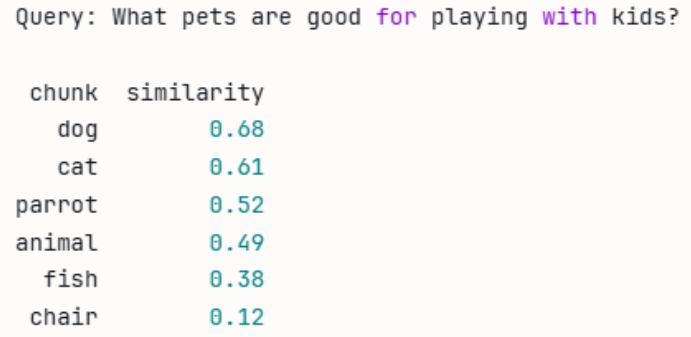
Because we’re working with a small example, we can see that the response is correct. The question asked about playful pets, and the corpus mentions that dogs are playful. “Dog” has the closest similarity to the question, and it’s what we want to use to answer it.
Incorporating RAG into the Chatbot
It’s unlikely that you’ll have a single, static list of labels to respond to queries. You probably want the chatbot to respond like it’s having a conversation with your customers. The vectorization of your corpus is the first step in incorporating RAG. A RAG is a system used to customize answers using your own information and then passing the information to an LLM to complete the response to a user’s query.
You don’t need a RAG in every scenario, but many companies use a RAG system in a chatbot to answer user questions about products. You don’t want to send a user’s question directly to an LLM, because the response would be related to the entirety of the internet. A RAG processes your own documentation about products, vectorizes the documents and user questions, and then uses the output to then send to an LLM.
Now that we have vectorization of queries and our corpus, let’s now turn it into a small RAG. To incorporate a RAG, you need to import an LLM. For this example, we’ll import Anthropic Claude. You’ll need to install this dependency first, just like we did in the earlier examples. The code now looks like this:
 sentence_transformers import SentenceTransformer
from sklearn.metrics.pairwise import cosine_similarity
import anthropic

# --- 1. Your knowledge base (document chunks) ---
chunks = [
 "Cats are independent pets that are known for their curious and playful nature.",
 "Dogs are loyal companions and are one of the most popular pets in the world.",
 "Parrots are intelligent birds that can mimic human speech and live for decades.",
 "Animals require proper care, nutrition, and a safe environment to thrive.",
 "Fish are peaceful pets that are easy to care for and come in thousands of species.",
 "A chair is a piece of furniture designed for a single person to sit on."
]

# --- 2. Convert all chunks to vectors (done once at startup) ---
model = SentenceTransformer("all-MiniLM-L6-v2")
chunk_vectors = model.encode(chunks)

# --- 3. Customer asks a question ---
query = "What pets are good for playing with kids?"

# --- 4. Convert question to vector and find the best matching chunk ---
query_vector = model.encode([query])
similarities = cosine_similarity(query_vector, chunk_vectors)[0]
best_match_index = similarities.argmax()
retrieved_chunk = chunks[best_match_index]

print(f"Retrieved chunk: {retrieved_chunk}\n")

# --- 5. Send the question + retrieved chunk to Claude ---
client = anthropic.Anthropic(api_key="your-api-key-here")

message = client.messages.create(
    model="claude-opus-4-6",
    max_tokens=256,
    messages=[
        {
           "role": "user",
           "content": f"""You are a helpful pet assistant.
Use only the following information to answer the question.
Information: {retrieved_chunk}
Question: {query}"""
        }
    ]
)

print(f"Question: {query}")
print(f"Answer: {message.content[0].text}")
In this code, you can see that the results of the vectorization step are then passed to the LLM, which then displays an answer to the user. This example uses animals with a corpus involving animals, but you can switch out the animal corpus with your own product documentation and perform the same task. You would then have RAG to handle questions about your products, essentially customizing a chatbot and providing customers with a conversational response to their queries.
Here is the LLM response to our RAG input:

Where to Go Next?
Join my newsletter to get updates on AI, cybersecurity, and programming.