
I think it’s a safe bet to assume you’ve heard of all the big-name large language model (LLM) companies: Anthropic Claude, OpenAI ChatGPT, Google Gemini, Microsoft Copilot. Whether you’ve used them personally or in your work life, they’re pretty easy to understand once you work with them a bit. If you run a business, you may have heard of a Retrieval Augmented Generation (RAG) system. This is where AI, agents, and the systems that work with automation might get a bit complicated, especially if you’re new to everything.
If you run a small business, this article is for you. The first step is understanding RAG, what RAG systems can do for your business, and if you want to invest time and money into building one. Not every business needs a RAG system, even if commercial businesses want to make you think AI is the only way you can sustain revenue. This article will cover determining if you could use one, what you need, and an overview of what to expect. Later on, I’ll get into building RAG, but suffice to say that you will need some development and IT experience.
First Step is Determining if RAG Can Do Something Beneficial for You
Big tech keeps pushing AI into everything, and the fact is that you don’t always need AI to automate. Some things AI and LLMs do very well, and others just frustrate users. Do a simple search on how much Upwork’s users (freelancers and the clients that hire them) like their AI automated support and you’ll see that their AI support has done nothing but hurt their reputation. For this reason and more, you don’t want to use AI for everything.
Here’s a few business use cases where AI can be useful:
- Low-level customer support questions (chatbot), but always forward users to a human customer support person if the AI chatbot can’t answer.
- Product questions like letting users ask questions about popular products or ones that are coming out soon.
- Internal tools like giving employees statistics or information about popular products, revenue, and information on sales and shipments.
- Internal chatbots to help new employees find answers to questions on how to do a specific job task.
- Monitoring the web for competitors, content, trends, alerts, or anything that would take time to research every day.
These are just a few examples, but think of RAG systems as a way to use an LLM specifically for your business rather than using the entire web as a reference. For example, suppose that you want to create a chatbot where users can ask questions about your products. If you use an LLM for the chatbot and let it use its default web of information, you could get incorrect answers (also called hallucinations in the LLM world) and you can spend a lot of money unnecessarily.
RAG systems narrow down the scope of information to only your business data, but give your systems the ability to have a conversation with the user. Think of RAG as a way to customize Google to answer questions related to your business without confusing your products with your competitors or using outdated information. Users can still ask questions, but answers will come from your own knowledge base (called a corpus in the AI RAG system world).
Next, What Do You Need to Build a RAG System?
If you think to yourself that you’d still like to dive into building a RAG, you’ll need some IT infrastructure outside of the standard setup. This is where a professional can help, but you can at least have some expectations. This article is specific to small businesses, so we’ll focus mainly on the most affordable way to dive into RAG systems so that you can experiment without hefty costs. Costs will increase if you decide to move forward and “go live” with your system.
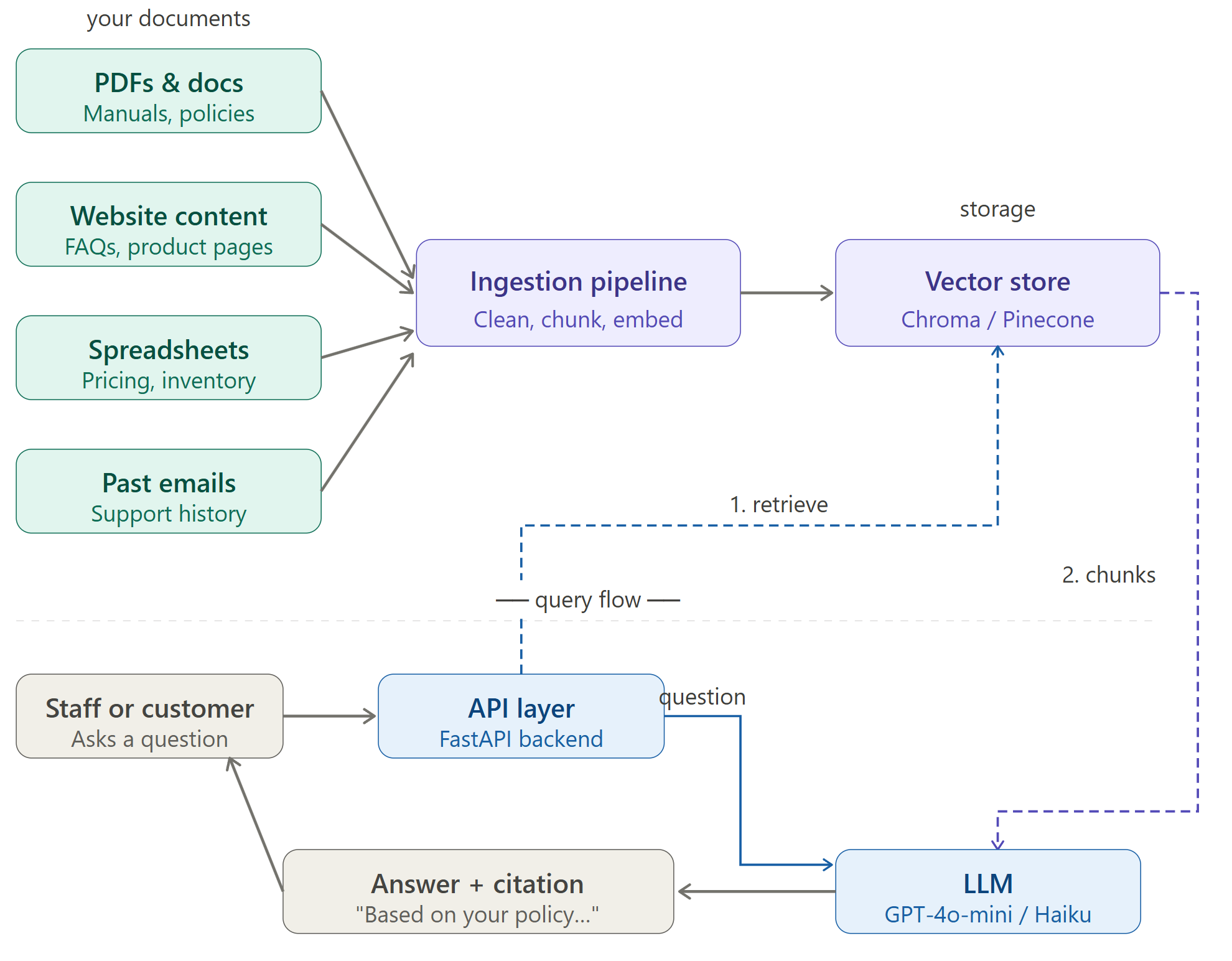
RAG system architecture diagram
Here are IT components and skills that you need:
- Your data (also called a corpus): The data you need depends on what you want to do. If you want to build a chatbot to answer product information, you need all the documents and data that contain information about that product.
- Embedded model: Before you send data to an LLM, you need to take your documentation and create “chunks.” These chunks are small phrases or sentences that contain information, and an embedded model turns them into numerical values. You can check out Ollama, which is not an embedded model but it’s a tool used for running embedded models.
- Vector database: You need a database to store the numerical representations of your chunks. Vector databases allow your RAG to search for chunks that perform a semantic match on a user’s query. Check out ChromaDB as an affordable option.
- LLM API: Any LLM will do, but I prefer Anthropic Claude. Your RAG system passes questions to the LLM to answer in a conversational way.
- Cloud hosting: You’ll probably want to run your RAG in the cloud, so choose your provider. AWS, Azure, and Google Cloud are the big options, but other vendors might suit your needs.
You can also add a couple optional components:
- PostgreSQL + pgvector: You might prefer to use a traditional database instead to store in a vector-specific database.
- LangChain / LlamaIndex: Although these technologies are optional, they reduce overhead by a lot. Instead of building raw Python code and scraping for data ingestion, these orchestration tools make the process much easier. They have pre-built components for data ingestion, chunking, retrieval and integrations with your chosen LLM.
Unless you plan to host storage and processing locally, you’ll need cloud IT components. Here are a few general infrastructure items you’ll want to consider:
- Cloud storage: Store the scraped and ingested data. Something like AWS S3 buckets or an equivalent on another provider.
- Computing power for chunking: AWS Lambda or equivalent on another provider.
- Database hosting: It might make sense to host your PostgreSQL database in the cloud as well.
- Domain: Your site’s domain registration.
- Monitoring: Every cloud provider has a monitoring tool. Monitoring will detect issues and give you an idea of how much cost you are incurring. Providers like Azure can give you cost optimization ideas.
Here’s a ballpark estimate on what you’ll spend per month:
| Component | Budget option | Mid-tier option |
| LLM API (OpenAI/Anthropic) | $5 -15/mo | $30 – $80/mo |
| Vector database (Pinecone) | $0 (free tier) | $70/mo |
| Hosting (Railway/Fly.io) | $0 – $5/mo | $20 – $40/mo |
| Embedding model | $0 – $2/mo | $5 – $10/mo |
| Domain name | $1/mo | $1/mo |
| Total | ~$6 – $23/mo | ~$125 – $200/mo |
What to Do Next
I plan on this being a series of posts that show people step-by-step how to build a simple RAG system. It’s intended for small businesses, so I won’t get too deep in the weeds and complicate it. From a simple RAG system, you can take it to a more complex level. I will do everything from deploying IT infrastructure to creating code to deploying it and watching it run.
To follow along, sign up to my newsletter to get notifications.