

You might have heard of typosquatting in cybersecurity and phishing, but it’s hard to find examples before they’ve been removed. A recent Nuget vulnerability shows exactly what can happen when you don’t pay attention to Nuget developer details and install Nuget packages indiscriminately. As of this writing, the malicious Nuget package is still available in Visual Studio (image below taken on December 16, 2025). Along with typosquatting, a homograph attack allowed the malicious developer to evade detection since 2020.
What Does the Typosquatting Attack Do?
Typosquatting is usually a phishing domain strategy, but it can also happen in open-source libraries. Developers download the misspelled library and don’t notice that they’ve now installed malware into their application. When the application is deployed to customers, attackers then have access to those customer resources. Supply-chain attacks are more popular in recent years. Instead of getting access to a single machine, attackers have access to potentially millions.
In this cybersecurity incident, the Nuget package Tracer.Fody has a typosquat alternative named Tracer.Fody.Nlog. The developer account name for Tracer.Fody.Nlog is also typosquatted. Instead of the legitimate developer “csnemes” for Tracer.Fody, the malicious Nuget package Tracer.Fody.Nlog uses the developer name “csnemess,” a typo that could go unnoticed.
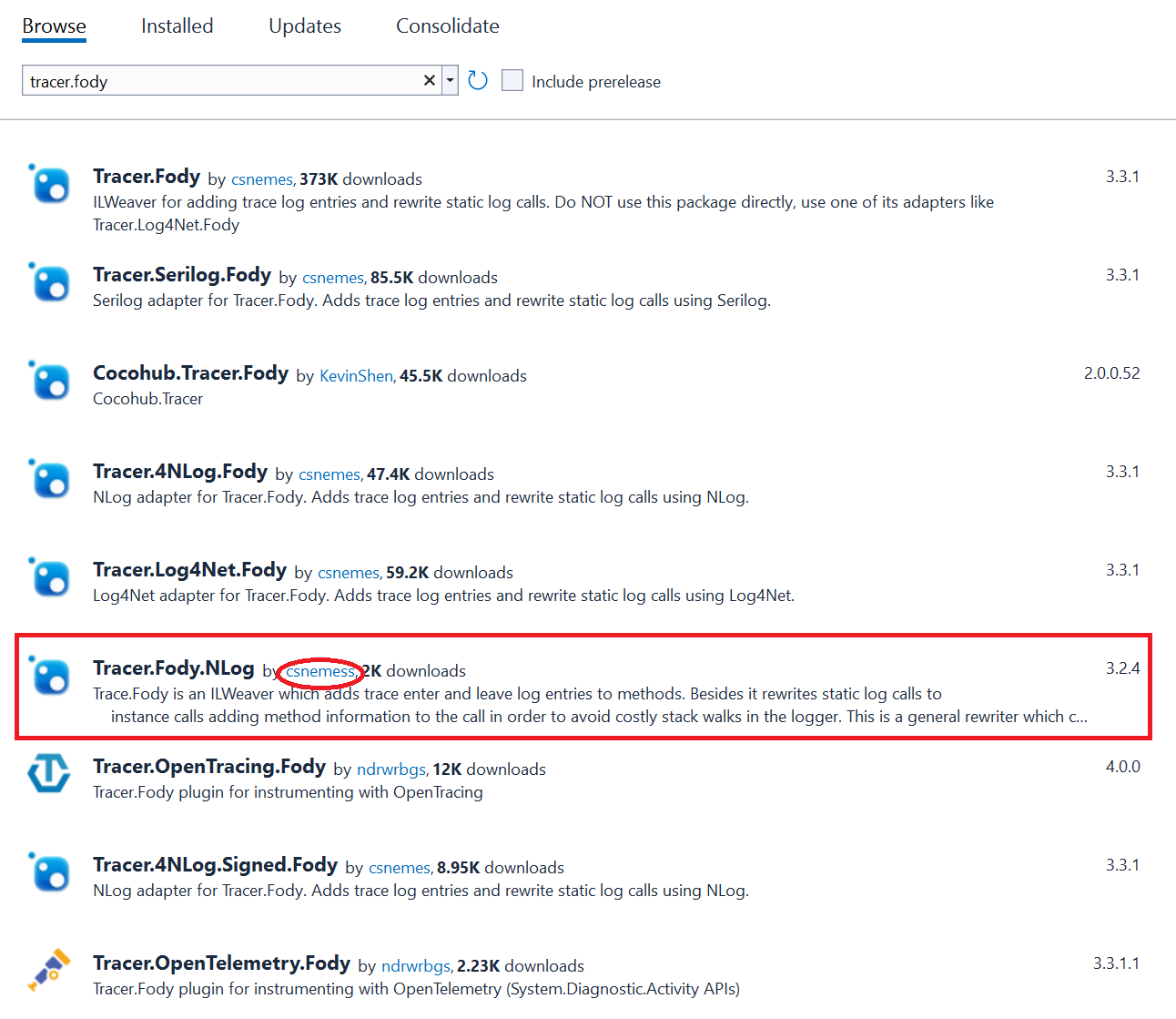
Malicious Nuget package Tracer.Fody.Nlog typosquatting as a legitimate library
The legitimate Tracer.Fody package is a logging library to help developers with tracing actions in a .NET application. Legitimate packages are often the target of typosquatting because the legitimate package has potentially millions of installs and developers won’t notice the misspelling. Most cybersecurity typosquat incidents involve phishing domains, but supply-chain attacks in libraries and extensions are more common in recent years, making it much more effective to have malware installed in legitimate software. In this case, the Tracer.Fody package has a couple thousand installs, but it’s enough to steal several crypto wallet keys. With a few wallets, crypto attackers could make seven figures for their efforts.
Malware in Tracer.Fody.Nlog steals cryptocurrency wallet keys using a hidden scanner in Tracer.Fody.dll, specifically for the blockchain platform Stratis. Code in Tracer.Fody.dll scans the directory “%APPDATA%\\StratisNode\\stratis\\StratisMain” for wallet.json files and passwords stored in your computer’s memory.
Even researchers didn’t catch the impersonation attack of the legitimate Nuget library due to an additional strategy called a homograph attack. A homograph attack is especially effective in a typosquatted library because they are implicitly trusted. Unless cybersecurity researchers and developers are looking at network traffic, nothing would seem out of place. Network traffic analysis for Tracer.Fody.Nlog shows that a dump of data is sent to a Russian server, specifically an IP address of 176.113.82.163.
As you can see from the malicious IP scan above, several virus scanners cleared the IP address as a safe web location. The malware evasion tactic using homograph attacks was successful for years. Homograph attacks are usually in phishing campaigns, but it works with hidden malware in coding libraries.
Homograph Attack Hidden in DLL Files
In addition to typosquatting, the malicious Nuget library uses a cybersecurity strategy called a homograph attack. A homograph attack uses letters that look similar to the English alphabet, but they are actually cyrillic letters from the Russian alphabet. For example, look at the following English letter:
a
Now look at the Russian alphabet letter for a homograph attack:
а
You can’t see the difference unless you look at the underlying unicode. You might see it represented as U+0430 or 0x0430 or encoded in HTML to а. Most people don’t look through text to identify if it’s cyrillic letters masquerading as English, so they innocently open the phishing domain or install the malicious library. The latter is common in supply-chain attacks, which gives an attacker access to potentially millions of vulnerable servers or machines with the libraries installed in legitimate applications.
How to Stay Safe from Impersonation Attacks
Even popular libraries could be compromised in a supply-chain attack. You can’t control what the developer does, but you can control the Nuget libraries added to your source code. Do research on the code before you add it to your own applications. A full review (and maybe a cybersecurity scan if you have the tools) could expose malicious code before your application becomes vulnerable.
Most developers won’t check for cyrillic letters or go down the rabbit hole of included libraries in third-party software. An alternative way to protect your software from supply-chain attacks is to keep your application’s libraries updated with the most recent version, stay alert for notifications of recent supply-chain attack news, and work with penetration testers to find vulnerabilities.
Vulnerability scanners and automation are beneficial, but these scanners work on known issues. Still, scanning your software for vulnerabilities identifies if any libraries have known exploits. Also, watch any logs from your firewalls to identify if you have outgoing requests to suspicious IP addresses.